pdigger · digital twins from cameras

Your site.
As live data.A digital twin, here A live, structured copy of what happens on site: vehicles and, where it can be seen, their load; people, hands and parts on a line; valves and alarms on a control screen. Each with its time, its place and the picture it came from. Numbers and events you can count, check and act on, instead of hours of video to watch.

From the cameras and screens you already have.

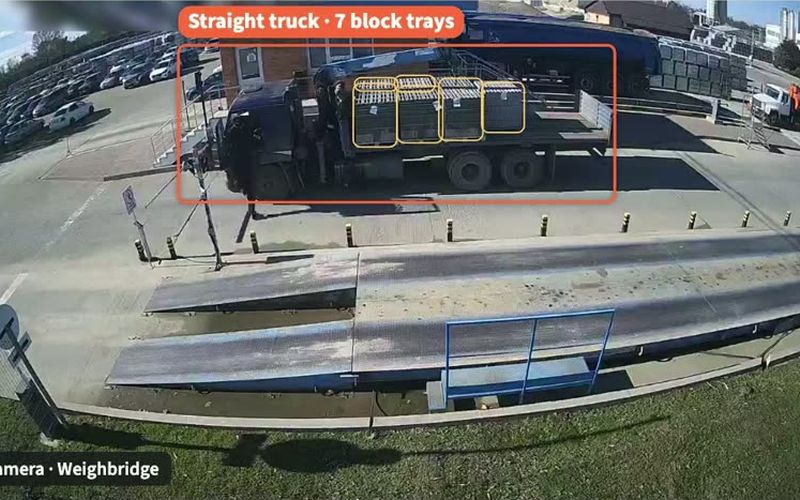
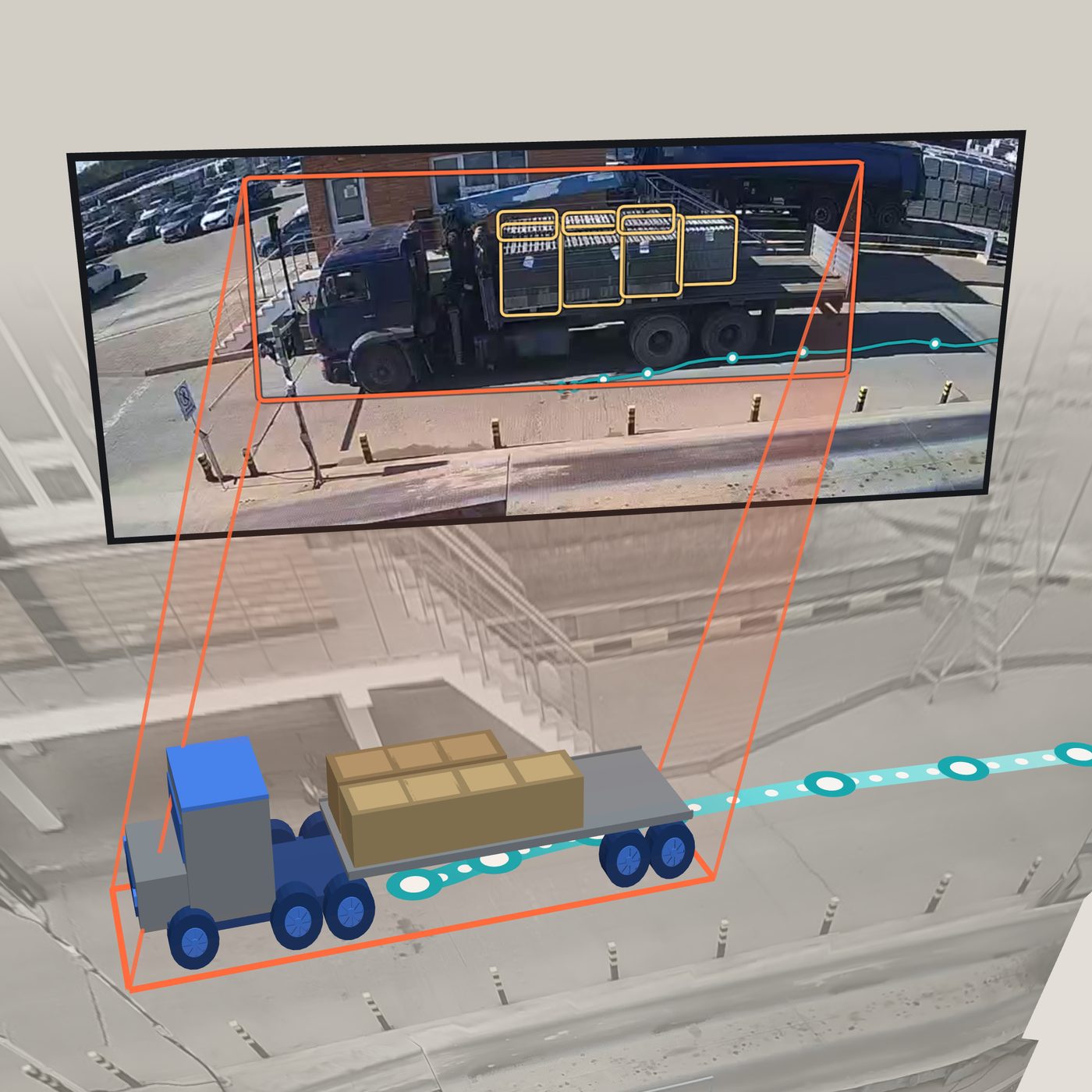
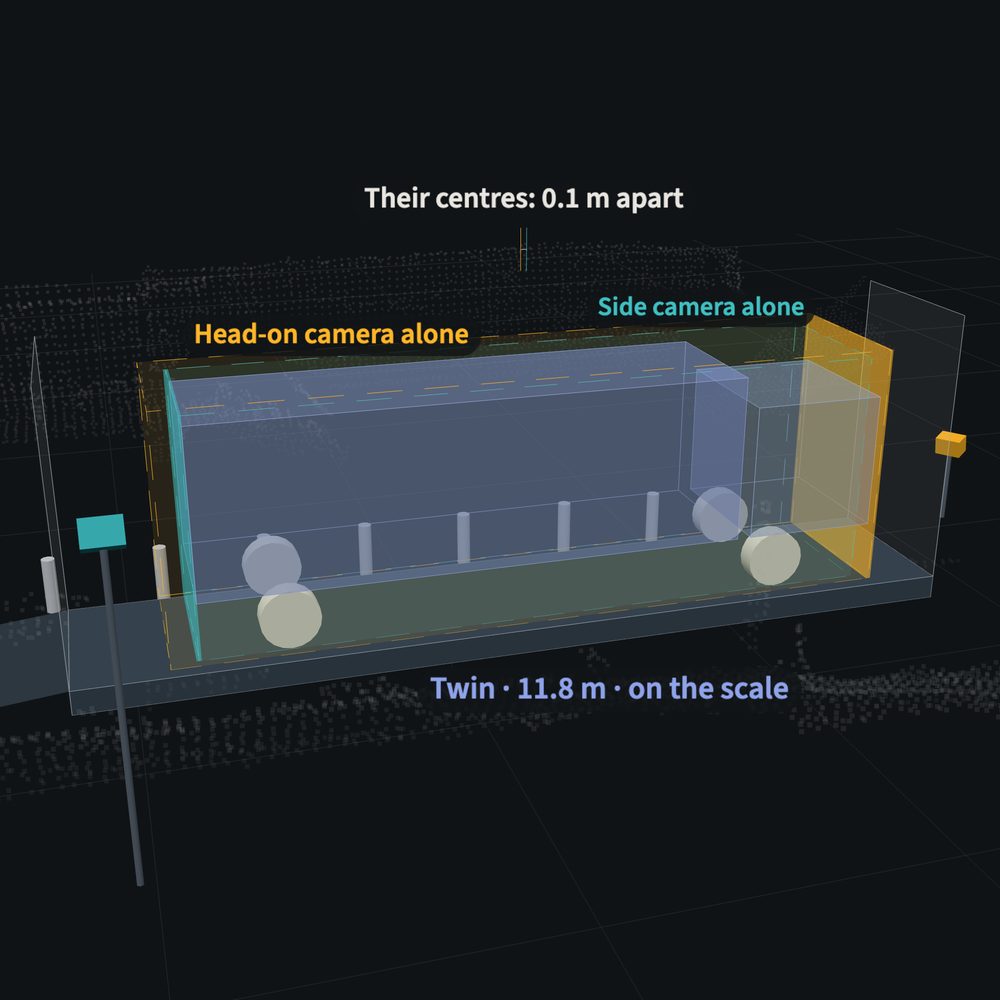
A weighbridge camera's picture, shown as a screen above its 3-D copy: a flatbed truck with seven block trays, its path marked once a second. The camera's view One fixed CCTV camera at a weighbridge, as it is. Nothing is fitted to the trucks or to the site. What the model reads The truck is found, framed and typed; each block tray on its deck is boxed. In every frame, about five times a second. The twin The same truck as a 3-D object, placed in metres. It moves only as a real truck can: speed and turns are limited by the mass of its vehicle type, so it never jumps or spins. Counted, then fixed Seven trays. Each view gives a count; the count is fixed for the visit once enough views agree. Its track One mark a second along the way it drove: where it went, and when.
OutdoorsSeven trays, counted from one CCTV cameraA weighbridge camera A fixed CCTV camera at a weighbridge, as it is. The truck is found and typed, its trays counted on each view (5, then 6, then 7) and the count fixed for the visit. Live on a Jetson Orin NX: 1280 × 720, five frames a second. Deliveries counted while the truck is in view.

The approach

Camera in. Model on site. Data out.

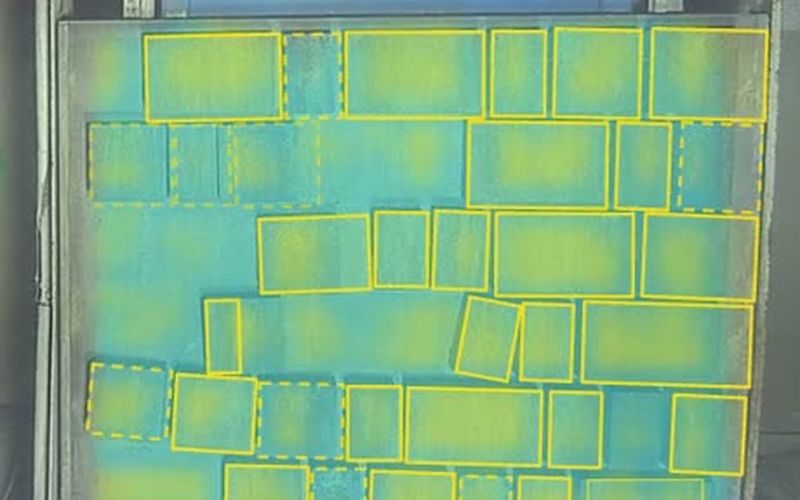
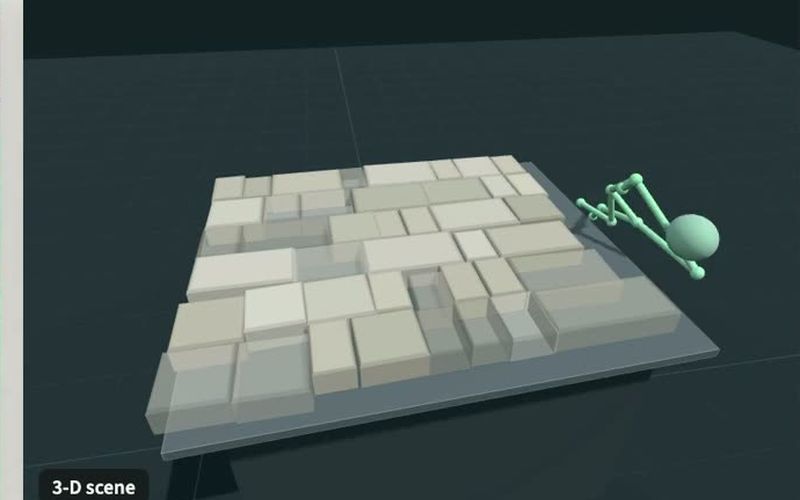
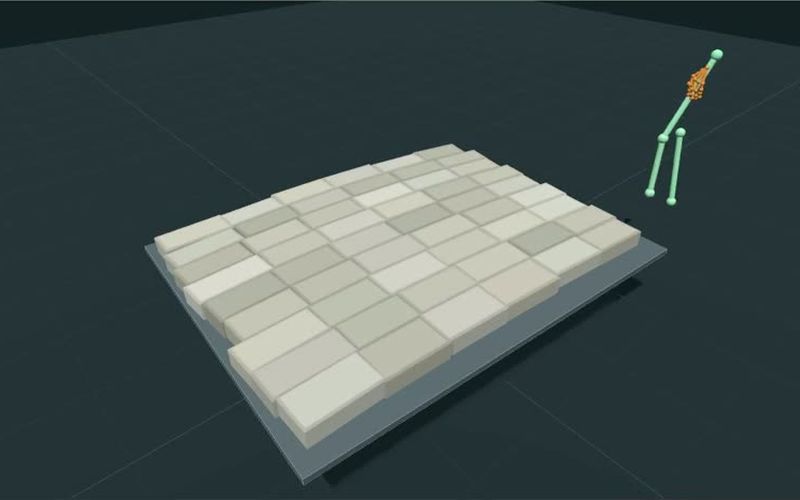
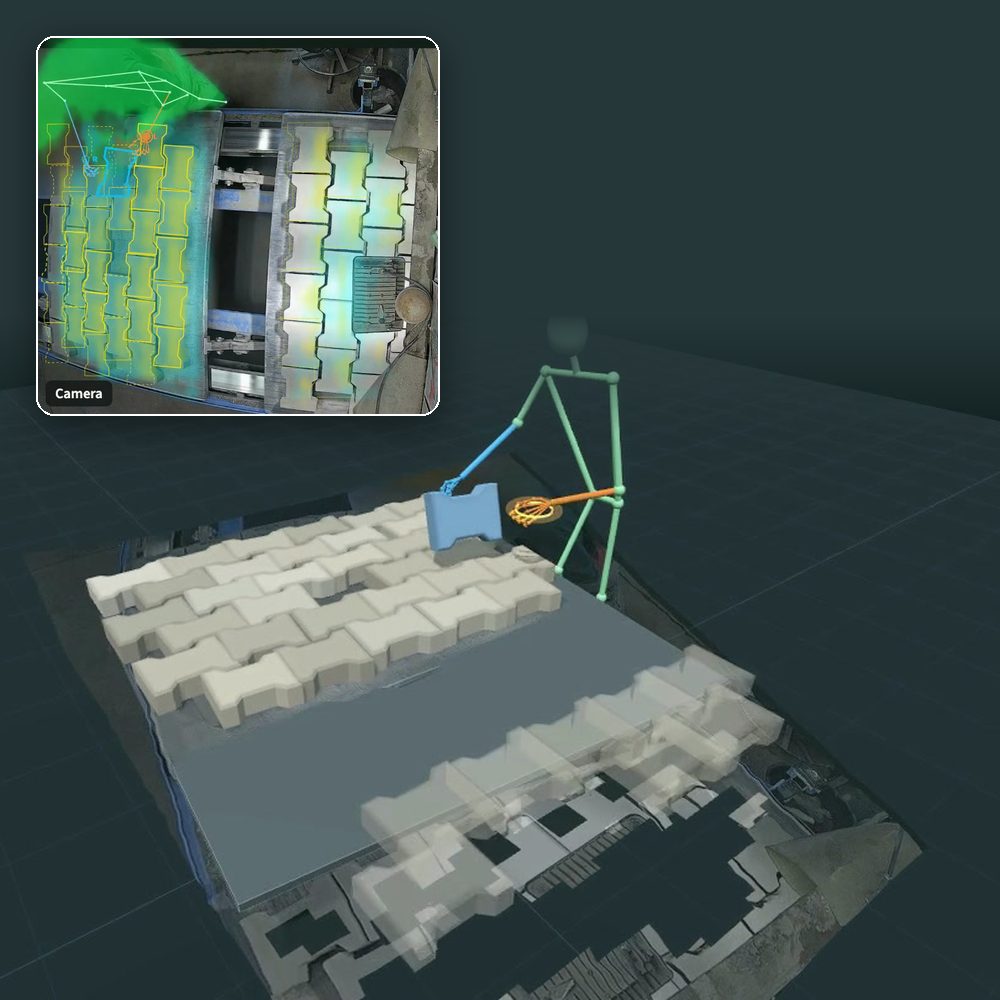
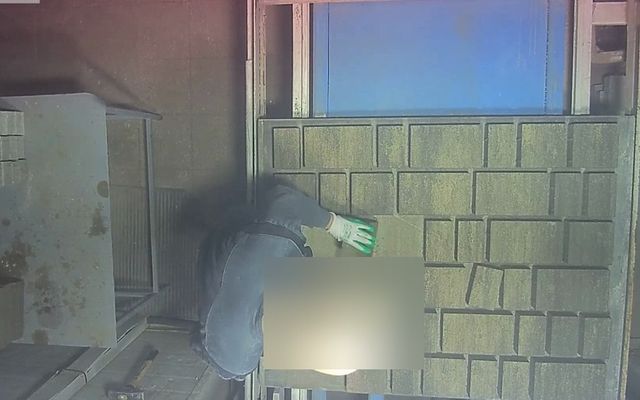
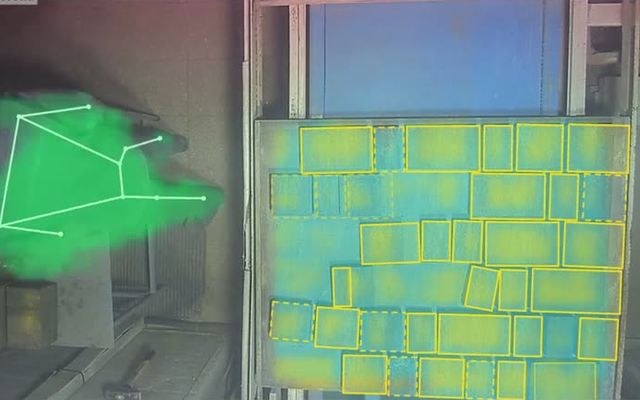
Four steps, reused for each domain.One recording, four steps The pictures follow one recording on a working stone line: the camera alone, what the models mark on it, the 3-D scene rebuilt from it, and its record as reviewed against the footage. The outdoors and factory models were built this way; for control rooms, labelled synthetic screens take the place of mapped footage.

  1. A camera looking down at a tray of stones and a worker's gloved hand.

    01

    Monocular cameraOne ordinary camera A fixed CCTV camera over a yard, a camera above a work area, or the video signal of a control screen. One view is enough: no depth sensor, no tags on vehicles, parts or people. No new hardware to start: footage you already record is enough to see what can be measured.

    • CCTV
    • line camera
    • screen video
  2. A frame from the same recording with the worker's arm as a skeleton and every stone on the tray boxed.

    02

    Data mappingSpecialised models and VLMs Large, slow models do a first pass offline. Detectors and trackers find every vehicle, person, hand and part; pose and depth models place them; vision-language models (VLMs) describe what they see: the type of truck, how full its trailer is, what a person wears. Two independent opinions and a tie-break, checked against examples a person reviewed. Weeks of footage become a labelled dataset without a team drawing boxes by hand.

    • detect
    • track
    • pose · depth
    • VLM labels
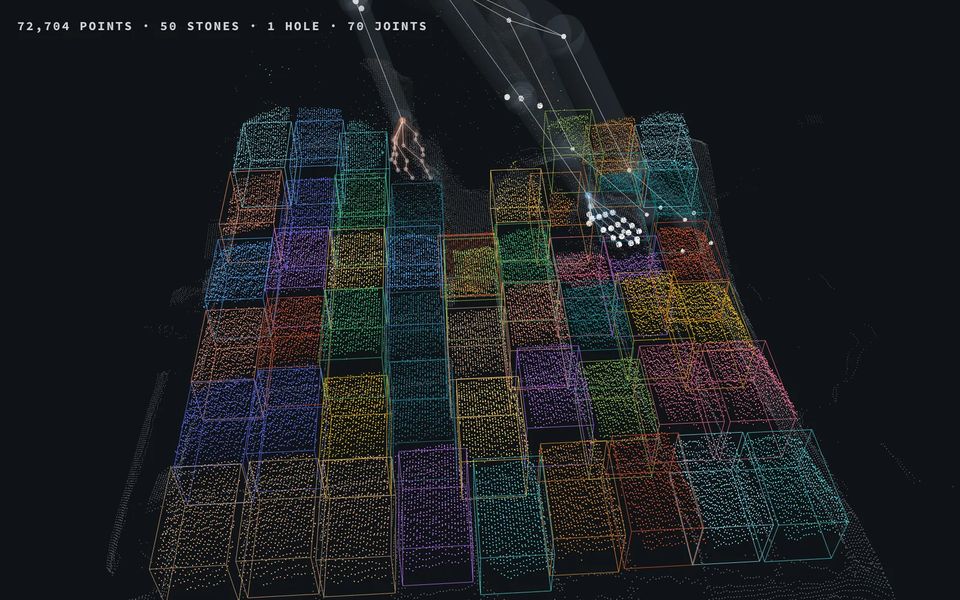
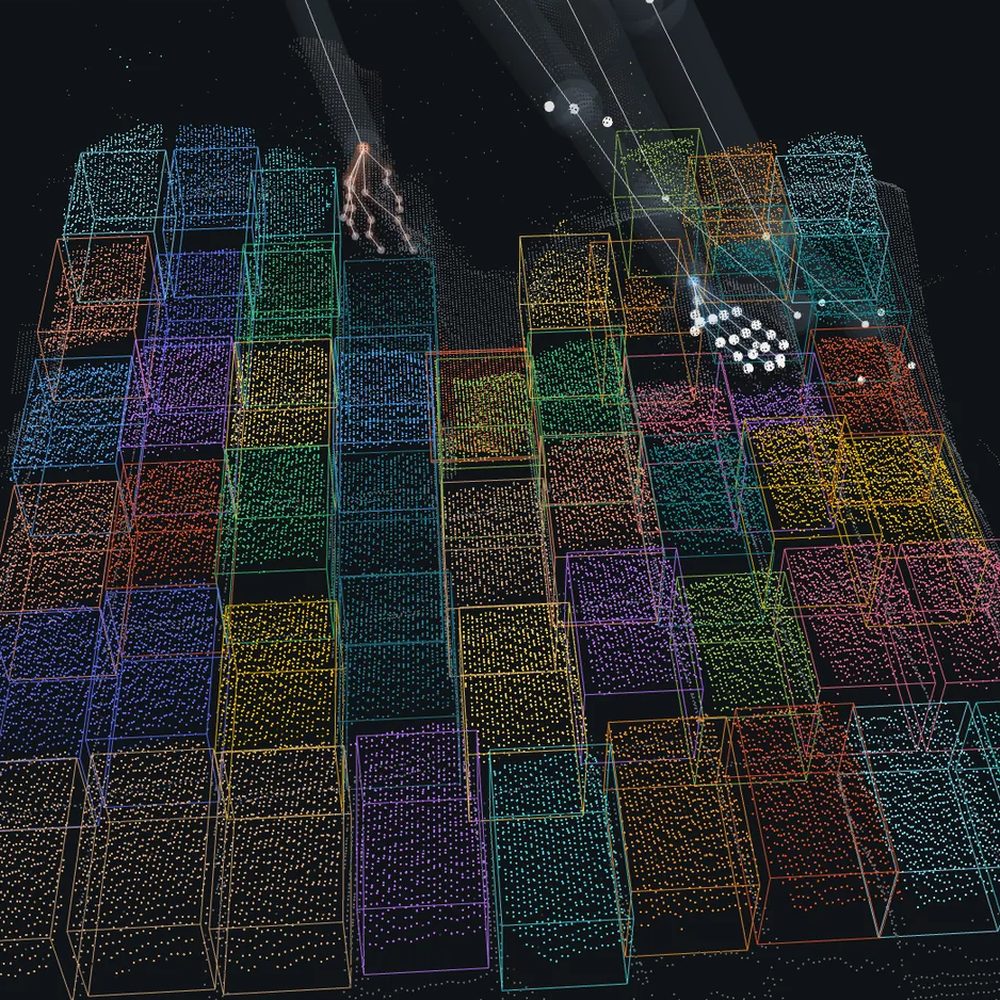
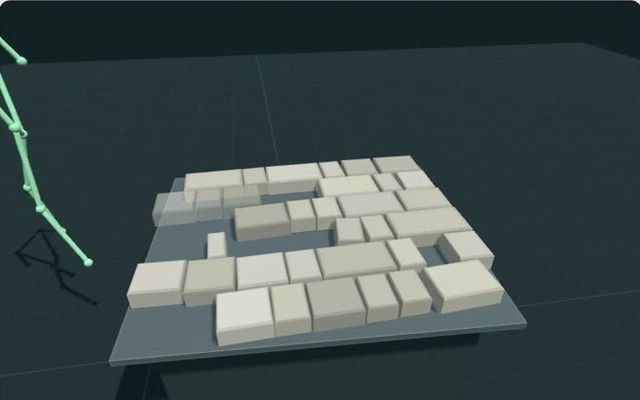
  3. The 3-D scene rebuilt from the camera: the tray of stones and the worker's arm as a skeleton.

    03

    A specialised modelSmall, fast, on site Those labels teach a compact model that does the same job in real time on a palm-sized edge computer: NVIDIA Jetson Orin NX, other Jetson modules, or similar devices. It is exported to the device's own runtime and checked to give the same answers it gave in training. Runs beside the camera at a fixed cost, many times a second, without sending video to the cloud.

    • Jetson Orin NX
    • Orin Nano
    • similar
  4. 04

    API into productionBuilt to embed The model's output becomes a record: events, tracks, counts and states, each with its time and evidence. Your systems read it over HTTP or as a live stream; for the factory API, SDKs for Python, TypeScript, Go and Rust are available on request. The data lands where decisions are made: MES, ERP, SCADA historians, BI dashboards, alerting.

    • REST
    • live stream
    • SDKs

Offline · once

Large models teachWhy not run the big models directly? Large vision models and VLMs are slow and costly per frame, need a data centre, and still miss site-specific details: one lesson from our yard was that they could not count two rows of trays on a truck. We use them once, to label, and let a specialised model do the daily work. A model trained on your scene is cheaper to run and better at your specific question.

detectors · trackers · pose · depth · VLMs

Gate

Checked firstA model ships only when it passes Before a model goes to site it is scored on examples it never saw in training, by a rule fixed in advance: counts, load bands, events. A change that does better on one number but worse on another does not ship. You decide on evidence: the pass rule is agreed before the result is known.

On site · every frame

A small model worksWhat runs on the device The trained model and its interpreter: the part that turns each frame's readings into tracks and events that make physical sense, such as a truck that cannot jump or spin. Predictable cost per camera, and results in real time.

Jetson Orin NX · Orin Nano · similar

What we build

Three domains. Yours next.

Each with its own site, films and API.

Outdoors · counting trays

Outdoors

Yards, gates, weighbridges.Outdoors pdigger A fixed CCTV camera becomes a record of vehicles, people and loads: who is there and what they wear, how full each trailer is, what a truck carries and which way it goes. Realtime at 5 frames a second, plus a processed record of the whole day, one entry per visit. Loads checked, visits logged and safety seen, from a camera the yard already has.

  • Loaded or emptyLoaded or empty A load band for each trailer, read from the frame where the load can be seen: 75–100 % full, or 0–10 %. Nothing is weighed or scanned.
  • Trays countedTrays counted A tray count for each view of the truck, fused across views and fixed for the visit once the views agree.
  • Two trailersTwo trailers The number of trailers, and a load reading for each one, front and rear.
  • DirectionDirection of travel One track per vehicle, the gate line it crosses, and which way: toward the camera or away.
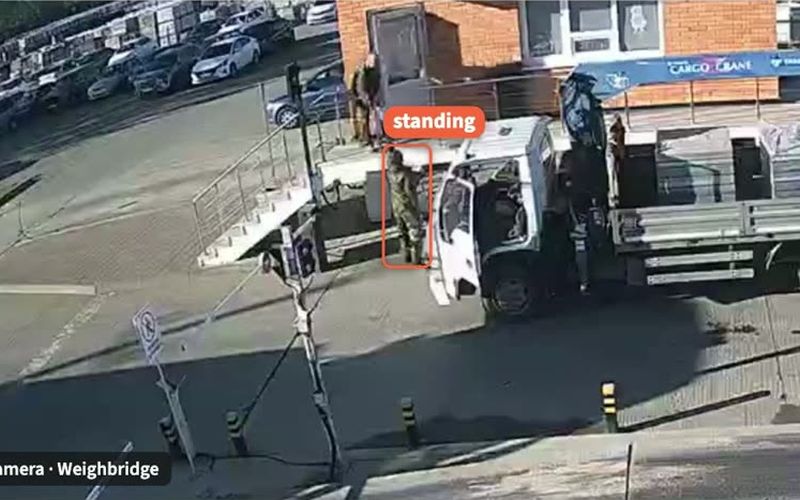
  • Hi-vis · hard hatPeople and safety wear Each person as a track, standing or walking, with a hi-vis vest, a hard hat, or neither.
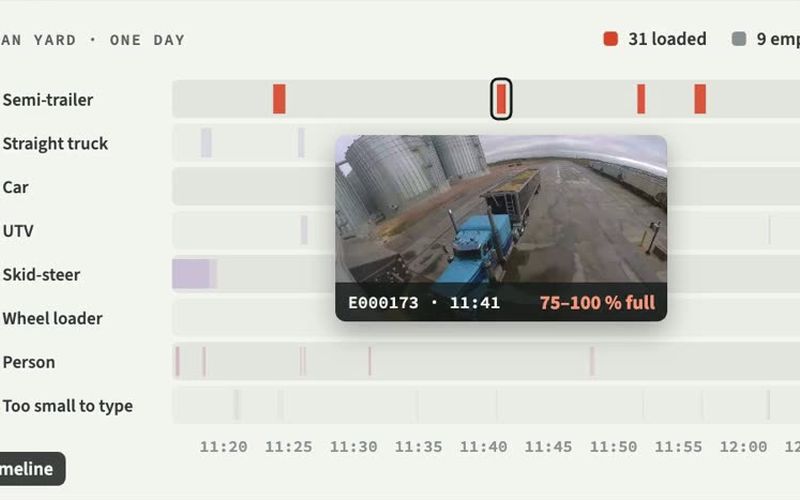
  • A day, per visitA day, processed One record for a whole day: in one recorded day, 378 events, 40 of them with a load reading.
outdoors.pdigger.com
Factory · hands to tray

Factory

Work areas and lines.Factory pdigger One ordinary camera over a work area rebuilds the hands, the parts and the tray in 3-D, and records what happened: which part was taken, moved or placed, and where on the tray. Faces are blurred before the footage is labelled. Manual steps on record, each with its time and place.

  • Taken · placedTaken and placed Which hand took which part, and where each part was placed. Our published examples are reviewed against the footage.
  • Tray addressTray address In our reviewed records, each event's row and column on the tray, such as row 6, columns 5 to 8.
  • Two handsTwo-hand handling The moment a second hand shares the same part, and which hand lets go.
  • PushesPushing The contact, and the parts that moved with it: in one push reviewed against the footage, five stones moved at once.
  • Tray replacedTray replacement A tray rolls out and the next rolls in; parts riding out with their tray are not counted as removed.
factory.pdigger.com
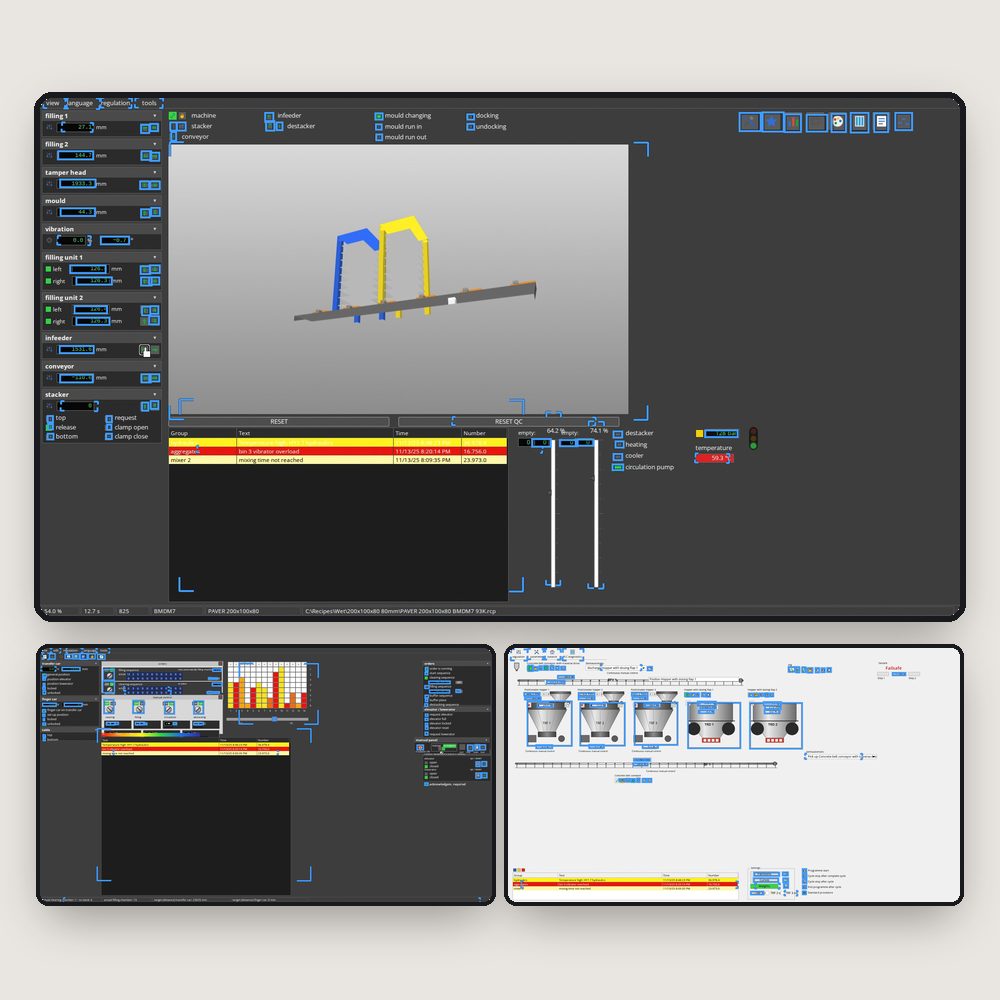
Control room · a synthetic test session

Control room

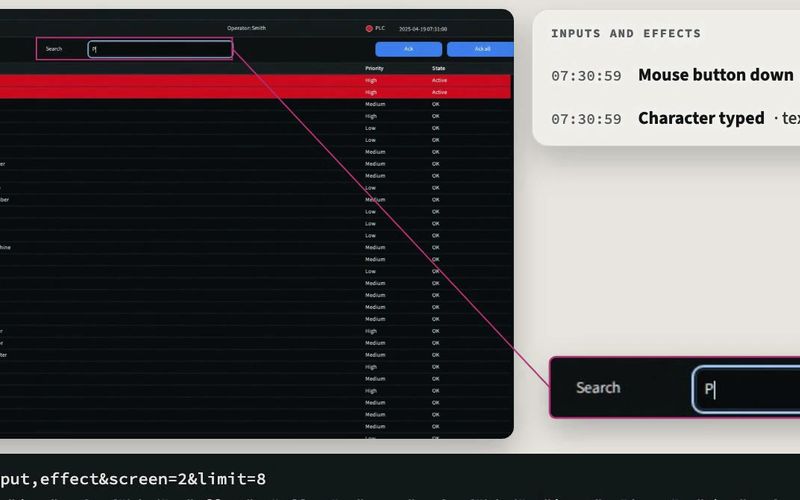
SCADA and HMI screens.SCADA pdigger A design for a small computer on the screens' own video cables that reads up to three operator screens: the pumps, valves, conveyors, values and alarm rows on them, the presses and typing it sees, and what changed. Nothing is installed on the plant's computers. Built and tested on synthetic plant sessions. Data from control screens without changing the control system: it takes only the screens' video signal.

  • Parts and statesParts and their states Valves, pumps, conveyors and more, followed from one reading to the next, with each state and how long it lasted.
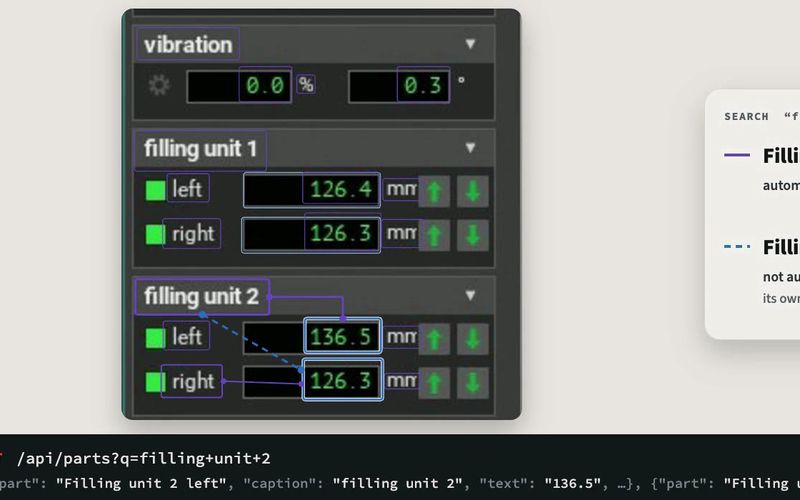
  • Values, tied to partsText tied to its part Values and labels are read and filed under the nearest part.
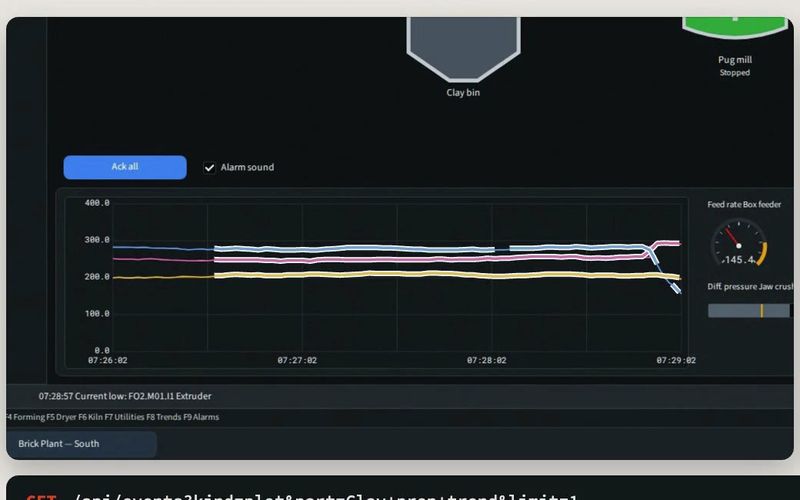
  • Charts in wordsCharts Each trend pen read from the picture: rising, falling or steady.
  • Clicks and typingMouse and keyboard Inputs seen in the picture, beside what changed on screen at the same moment.
  • Alerts, your wordsName it once Name a page, a type of part or one part once; changes then come back in the plant's own words, ready to filter, log and alert on.

Your domain

Your process. A model made for it.A domain-specific model If it can be seen from a fixed camera, it can often be learned. Tell us the questions you ask about your site. We map a sample of your footage and tell you what can be measured before anything is built. You get a model for your question, on your scene, scored on your own reviewed examples.

  • Ports and terminals
  • Quarries and aggregates
  • Warehouse docks
  • Construction sites
  • Food and agri intake
  • Any fixed camera
Describe your use case

Solvable tasks

Ask your site a question.

Examples from our three domains.What these pictures are Outdoors and factory pictures are from recordings at working sites; the factory examples were reviewed against the footage. Control-room pictures are from synthetic test sessions made by our screen generator. Each answer is the one shown in its picture.

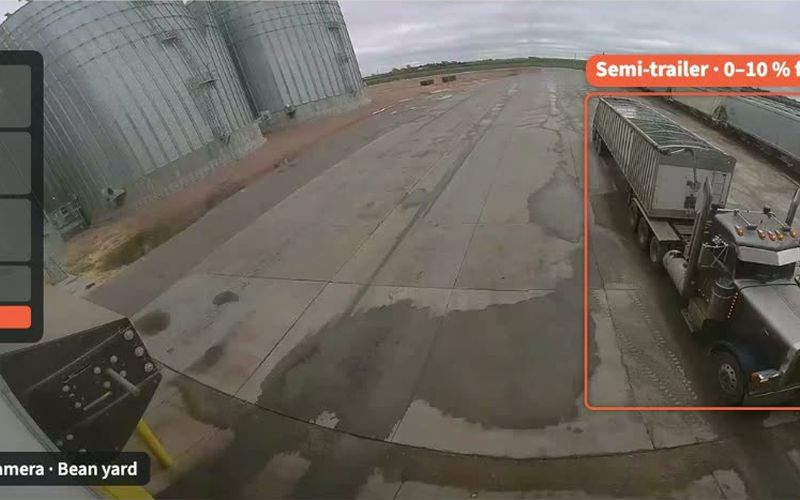
  • Camera view of a semi-trailer with an open hopper, framed and read as 0 to 10 percent full.Empty · 0–10 %

    Outdoors

    How full was each truck?What is recorded A load band for each trailer, from the frame where the load can be seen, with that frame kept as evidence. In the day's record, loaded or empty is known from the visit's first frame. Spot loaded and empty runs where the load can be seen.

  • Camera view of a straight truck at the weighbridge with each block tray on its deck boxed.7 trays · fixed

    Outdoors

    How many trays are on board?What is recorded A count on each view of the truck, one fused count across views (5, then 6, then 7) and the count fixed for the visit. A later view of six does not change it. Count trays while the truck is in view.

  • Camera view at the weighbridge: a person beside a truck, tagged as standing.No hi-vis · no hard hat

    Outdoors

    Who is on the yard without safety wear?What is recorded Each person as a track, standing or walking, with what they wear: a hi-vis vest, a hard hat, or neither. People are not identified. Safety reporting with the frame as proof, not a guess.

  • A day's timeline for the yard, one row per vehicle type, with one visit opened: 75 to 100 percent full.378 events · 24 h

    Outdoors

    What happened on site yesterday?What is recorded The processed record of a whole day, one event per visit with its type and time. In this recorded day: 378 events, 40 of them with a load reading, 31 loaded and 9 empty. A daily report of visits and loads without anyone watching footage.

  • Camera view of a tray of interlocking stones with each stone boxed and two gloved hands over it.Row 4 · column 3

    Factory

    Which part was taken, and from where?What is recorded Which hand touched, took and held each stone and, in the reviewed record, where it came from on the tray by row and column. Each step on record with its time and place.

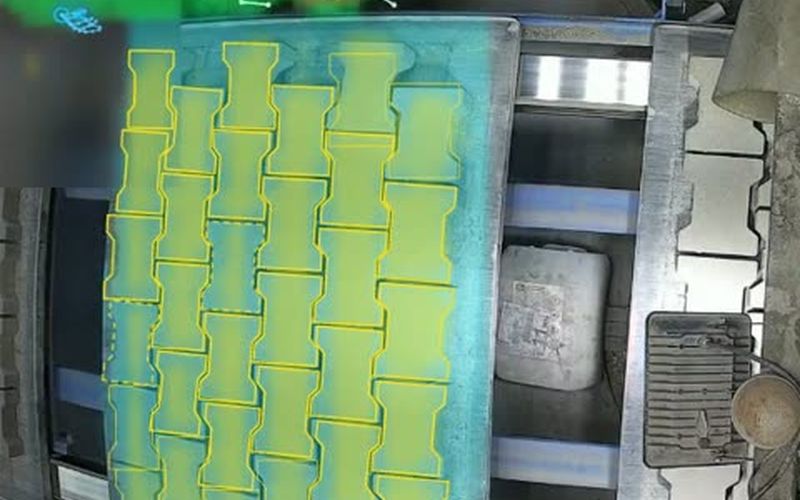
  • Close camera view of a tray with stones boxed and empty places marked with dashed outlines.7 places empty

    Factory

    Is the tray complete?What is recorded The empty places on the tray, and a running count of parts taken and places refilled. This example's empty places were reviewed against the footage. Catch gaps before the tray moves on.

  • The 3-D scene of a tray with a worker's arm as a skeleton placing a stone.4 placed · row 6

    Factory

    Where did each part go?What is recorded Each placement and its time; in the reviewed record, its address on the tray (here row 6, columns 5 to 8). Every event has a time, so the steps between them can be timed too. Know which step happened when: the base for cycle times and bottleneck spotting.

  • The 3-D scene of a full tray of stones settling into place, a worker's arm at its edge.New tray · settled

    Factory

    When was the tray replaced?What is recorded Each tray's state (moving, settling, still) and a new tray identity once the replacement is visible and settled. Count trays per shift and see where time goes between them.

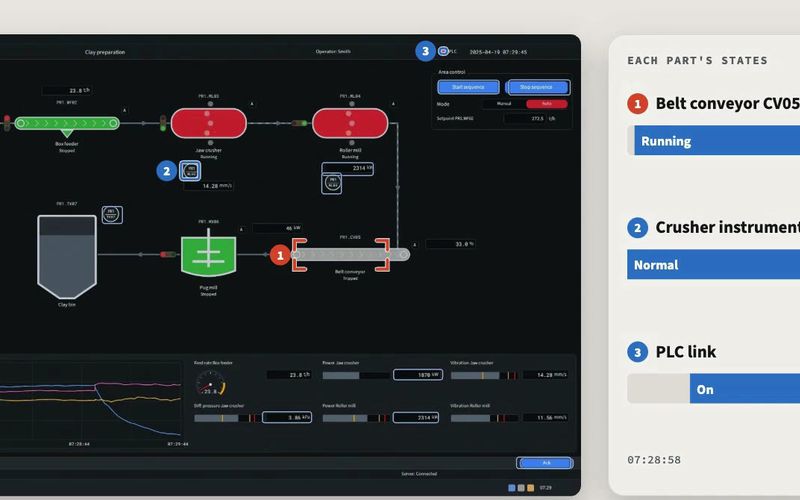
  • An operator screen with a conveyor, crusher and tanks, beside a card of each part's state over time.Running → Motor trip

    Control room

    Which alarms fired, and for how long?What is recorded Each part's states and how long each lasted, in the plant's own words once named: here, Belt conveyor CV05, running, then motor trip. Towards a shift log nobody has to type.

  • An alarm list screen and a card listing a mouse press and typed text, with the search field enlarged.Press · button pressed

    Control room

    What did the operator change?What is recorded Mouse presses and typing seen in the picture, beside what changed on screen at the same moment: a button pressed, text typed into a field. Operator actions on record, beside what they changed on screen.

  • A trend chart with three pens on an operator screen.Rising · falling · steady

    Control room

    Where is this trend heading?What is recorded Each pen of a trend chart read from the picture: its curve, and whether it is rising, falling or steady now and over the whole window. Trend summaries in words, for shift reports and early warnings.

  • A filling panel with values, and a search answer naming two parts with their read values.136.5 · unit 2 left

    Control room

    What does this value read now?What is recorded Values and labels read and filed under the nearest part. A search for "filling unit 2" finds the left value by its caption and the right one by the name we gave it. Screen values as data you can search.

Where the value comes from

  • No new sensorsCameras you already have Existing CCTV, a camera over a work area, or a screen's video signal. Nothing is weighed, scanned or tagged, and nothing is installed on control-system computers. Start from existing footage; no capital project to find out.

  • Evidence for every numberCheckable by eye Each reading keeps the time and the picture it came from, so any count or event can be checked by a person. Disputes are settled by looking at the frame, not by arguing over a number.

  • Real time, on siteAt the edge Models run on a Jetson-class device beside the camera: about five readings a second outdoors and on the line. The control-room model is designed for four a second. A fixed running cost per camera, results as things happen.

  • In your systemsAPI first REST and live streams; for the factory API, SDKs for Python, TypeScript, Go and Rust on request. Names and alerts can follow your plant's own words. Data flows into the tools your teams already use.

  • Privacy built inPeople are not identified The models record roles and actions, not identities, and factory footage has faces blurred before it is labelled. On an edge device, data rather than video can be all that leaves the site. Useful records without building a surveillance archive.

On site

Beside the camera. Into your systems.

Two ways to start.Choose your setup Keep your camera and send its recordings for online analysis, or put a device with the model beside the camera and take the data straight from its API. Start with recordings to prove the value; move to an edge device for live data.

How pdigger sits on a site A camera feeds an edge device running the model; the device's API feeds MES, ERP, BI and alerting inside the site network. Alternatively, recordings go to online analysis for a daily record. Your site network CameraCCTV · line · screen Edge deviceJetson Orin NX or similarmodel + world API MES ERP BI Alerts Online analysisfrom recordings Daily recordone entry per visit The edge device The camera's stream goes to a small computer on site that runs the model and its interpreter (the world: tracks, counts and events). Outdoors and factory models run on Jetson Orin NX; the control-room model is sized for a Jetson Orin Nano Super. The API Plain HTTP and JSON, with live streams (server-sent events) that resume where they left off. Everyone watching shares one session; every control can be dry-run first. Online analysis For a camera you already record: send the recordings, get a processed record of each day, one entry per visit with its type, colours and load.
GET /api/v1/loads?eventId=V05&state=loaded&limit=1

{"data": [{
   "id": "load-V05",
   "state": "loaded",
   "visibleFillPercent": [75, 100],
   "measurementBasis": "visual_estimate"
 }],
 "page": {"hasMore": false, "nextCursor": null}
}

Outdoors observation API, here over a recorded demo day: loads, vehicles, people, tracks and events, with filters and cursor pages.

  • 5frames a second, outdoorsOutdoors, realtime Every stream is processed at 1280 × 720, five frames a second, on a Jetson Orin NX.
  • ~5readings a second, on the lineFactory Model observations about five times a second; the camera video and 3-D scene are drawn on the same timeline.
  • 4readings a second, three screens, by designControl room The design rate: one reading every quarter of a second for three 1920 × 1080 screens on one Jetson Orin Nano Super.

Films

See it working.

Six short films from our channel.Privacy-enhanced player Each film shows a local picture until you press play; only then does YouTube's privacy-enhanced player load.

  • Outdoors Real-time scene understandingIntroducing Pdigger Outdoors The outdoors model in under two minutes: vehicles, people and loads from one yard camera, live.

  • Factory Understanding worker actionsIntroducing Factory pdigger From a camera over the line to a 3-D scene and a record of each hand's work.

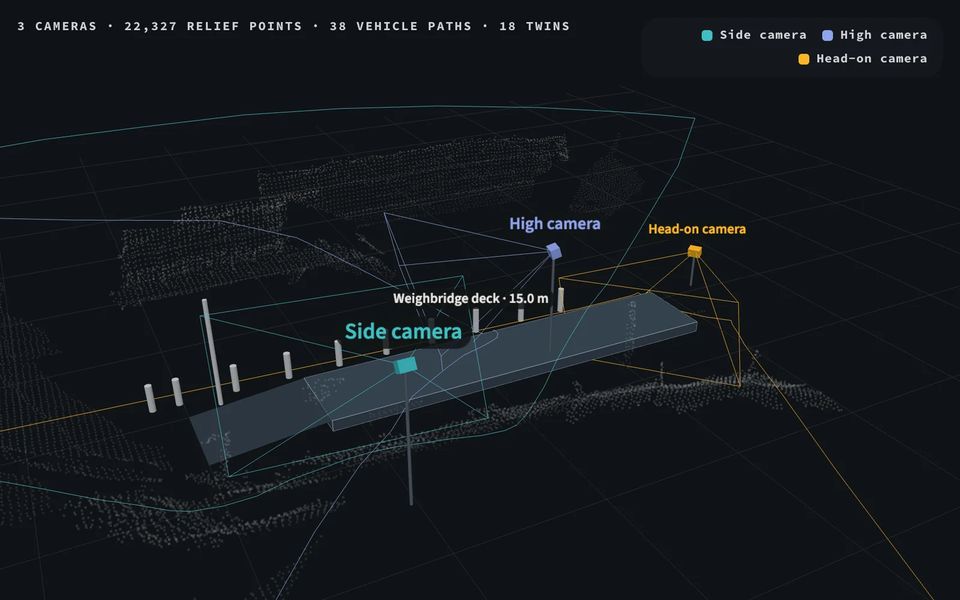
  • Outdoors Several cameras, one answerWhat one camera misses Cameras that share a weighbridge are linked into one 3-D picture of the yard, so each truck is seen from the front, the side and above.

  • Outdoors How full is a truck?How the outdoors model works The narrated tour: the model, a day of events and the 3-D interpreter that keeps motion physical.

  • Factory One camera, factory work in 3-DHow the factory model works The model, the scene that persists from frame to frame, and the ways to explore a recording.

  • Outdoors The yard in 3-DOutdoor camera analytics A half-minute tour of the 3-D explorer: vehicle tracks, loads and people from monocular outdoor cameras.

All films on YouTube

Build your model

Your domain. A model made for it.

Tell us what you need to see, count or record.

  1. 01Share a sampleShare a sample Recordings from the camera you want to use; a day is a good start. Nothing is installed for this step. You learn what can be measured before committing to anything.
  2. 02We map itWe map it Specialised models and VLMs label your footage. You review a small set of examples, which becomes the reference the model is scored against.
  3. 03We train and checkWe train and check A compact model for your scene, scored on examples it never saw, with the pass rule agreed in advance.
  4. 04Pilot on sitePilot on site An edge device beside the camera, or online analysis of your recordings, with the API into your systems.
I'm interested in

We'll use these details to reply. How we handle your information